
Point of sale
POS software for shops that also sell online
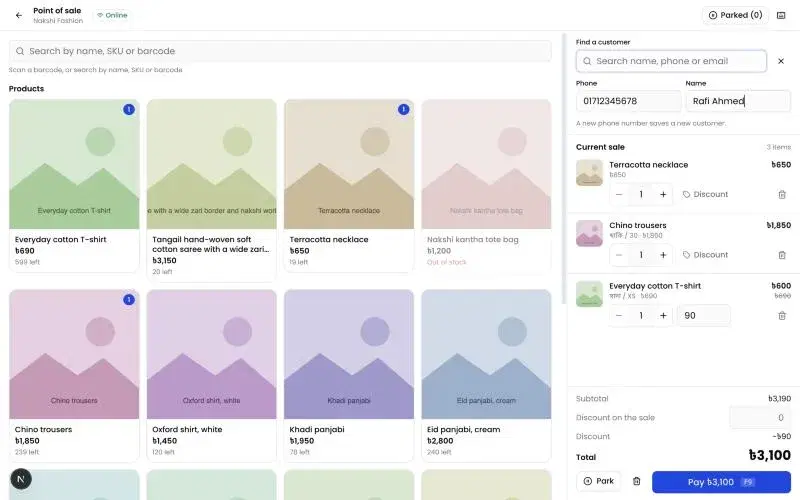
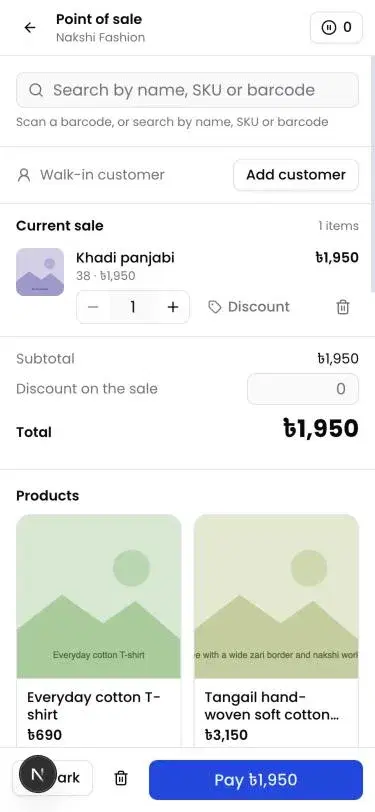
If you sell from a physical shop and online, POS software lets you ring up counter sales on the same stock as your website, so you never sell an item twice. FrameX POS is a register that runs in the browser inside your FrameX dashboard. You scan barcodes, print 80 mm or 58 mm receipts, take cash, card, mobile wallet or a FrameX Pay QR payment, and each sale comes off the same stock as your online orders. It is included in the Pro and Business plans.
Updated
Set up your counter
- 1
Add your products once
Products, variants, prices and stock live in one catalogue for both the shop and the website. Add barcodes or SKUs to scan them at the counter.
- 2
Open the register
Open POS from the dashboard on a laptop, desktop or tablet browser. A USB barcode scanner works like a keyboard, so no special setup is needed.
- 3
Choose your receipt paper
Print on 80 mm or 58 mm receipt printers from the browser.
- 4
Sell
Scan or search, add a customer by phone number, give a discount, and take payment in cash, card, mobile wallet or by FrameX Pay QR. Split one bill across payment types if needed.
- 5
Close the day
Open and close shifts, park a sale while a customer decides, and handle returns. Counter sales appear with your online orders in the dashboard.
What FrameX POS does
One stock
Shop and website sell from the same stock, so the website doesn't promise items the counter just sold.
Analytics and profitKeeps working when the internet drops
Sales made during a short outage wait in a queue and are sent when the connection is back.
See plansQR payments at the counter
Show a FrameX Pay QR code and the customer pays with bKash, Nagad, Rocket or card on their phone.
Online paymentsStaff accounts
Pro includes 5 staff accounts and Business has no limit, so each cashier signs in as themselves.
Staff and chatPlans
- POS is included in Pro (৳999 a month) and Business (৳2,499 a month).
- POS sales don't count towards any monthly order limit.
- Free and Starter plans don't include POS.
Common questions
No. FrameX POS runs in the browser inside your dashboard. Use a laptop, desktop or tablet with a USB barcode scanner and a receipt printer if you have them.
FrameX POS prints 80 mm and 58 mm receipts through the browser's print dialog, which most thermal receipt printers support.
Yes. Counter sales and online orders use the same stock.
Pro and Business.
Run your counter and website together
Start free, and move to Pro when you're ready for POS.